I was so used to using the Windows Key on the keyboard to open the Windows Start menu, I just expect it to work on Gnome panels too.
If you don't already have an Ubuntu "Main Menu" item on your panel, you can add one by right clicking on the panel, choose "Add to Panel," then scroll down to "Utilities" and click the "Menu Bar" item and then the "Add" button. If you want to move that item around on your panel, you can figure out how to do that by right clicking it.
Now to bind the Windows Key to that item. Click your panel's "Main Menu" item, then "System," "Preferences," and "Keyboard Shortcuts." Under the "Desktop" group, click "Show the Panel Menu," then press your Windows Key and you will see the associated binding change to "Super_L". Click the "Close" button on this dialogue and you are done.
Now when you hit your Windows Key, it opens the Main Menu, equivalent to the Windows Start button.
Showing posts with label ubuntu linux. Show all posts
Showing posts with label ubuntu linux. Show all posts
Friday, September 08, 2006


Thursday, September 07, 2006
Stop gnome-terminal screen clear
Gnome-terminal (and Mac OSX Terminal.app) clears your screen when you quit a pager or editor and I don't like it. You won't like it either if you need to refer to the thing you were just looking at after you exit back to shell. This happens with man, less, more, pico, vi and others.
Here's an example of gnome-terminal automatically clearing the screen when exiting a pager. This is what needs fixing:
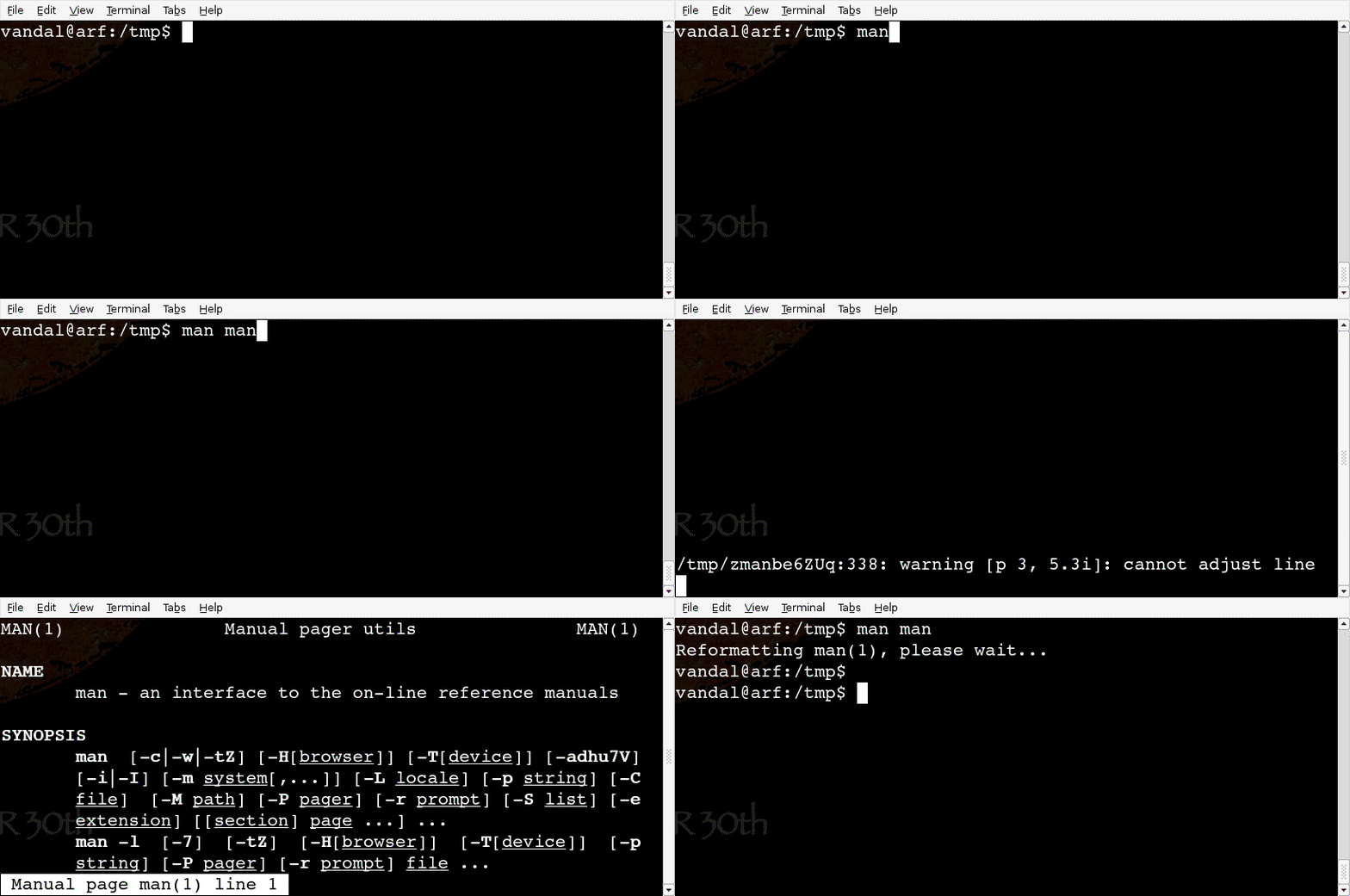
Here's what it does after we fix it. No more automatic clearing:

I used to fix this problem easily in the MUD by setting an environment variable: setenv NO_CLEAR 1
But Ubuntu Dapper is no LPMUD. I searched Google for the fix. Other people had the same complaint. The best source of synthesized info I found was here.
That writer, Akkana, understood the problem and offers some solutions for everything except gnome-terminal:
First, she correctly identifies that gnome-terminal is the source of my problem. I confirmed that by dropping out of X to a real console (CNTRL+ALT+F2), logging into my shell, and checking my TERM environmental variable:
This means that I can't solve this problem under X in a way that will break my console. How limiting.
Akkana offered 3 ideas and I tried them all. The first was to create a file in my home directory called .Xdefaults (symlinked to .Xresources, just in case) that contains these lines:
If I would just use xterm, my work would be done. But I do not like xterm.
Akkana's next suggestion is to create a ~/terminfo/xtermnoalt.terminfo file and export a TERM for it into the bash environment. She provides the file, doctored xterm-color terminfo data, but with the ti/te and rmcup screen clearing bits removed. Without those, gnome-terminal is supposed to be tricked into never trying to use those features.
It sort of works, but causes an extra prompt warning that my terminal is broken:
The 'man' utility ultimately uses 'less' to do its paging, and 'less' is actually the program emitting that warning. Even though I always use 'more' instead of 'less,' and 'more' still works fine, I look at man files a lot, and I am not satisfied with these results.
Technically, I could go a bit further and just hack a fix for man. The man file on man (in the --pager option) says that man uses /usr/bin/pager for paging, and that's just a symlink to /etc/alternatives/pager, which is itself another symlink to /usr/bin/less. So I could change that last symlink to /bin/more and then 'man' and 'more' would work fine. But that is a crummy hack that still leaves pico (actually /bin/nano) totally broken:
Akkana's last idea is to use a command option to 'less' to ignore terminal initializations, and yes, I could make an alias for that in ~/.bashrc so that I don't have to remember to type it (alias less='less -X') but pico would still be broken, and you know I need pico.
So I searched around the web trying to learn about termcap and terminfo. And that was hard. So instead, I downloaded all the other terminal emulators I could find, hoping to just dump gnome-terminal (apt-get install pterm aterm eterm multi-gnome-terminal konsole). I tried and hated them all.
In the end, I just got out my sledge hammer and did this:
This fixes Gnome-terminal which is now being fed a vt220 definition that it thinks is xterm. Really, gnome-terminal should give users a way to turn off the annoying screen clearing feature. You and I are not the only ones that find it a nuisance.
[A reader later posted a much better solution in the Comments that uses infocmp and tic to "fix" the terminfo definition file used by the terminal program. URLs at the end of the Conclusion section.]
If you want to know how I came up with this elegant solution, I just did a 'man terminfo' (lots of websites said this was caused by "terminfo") and at the top of the page it said, "Synopsis: /etc/terminfo/*/*," so I looked in there (ls -l /etc/terminfo) and found a single README file which said that if this directory is empty, ncurses (the library in charge of cursors and terminal-like things) would look in /lib/terminfo/*/*. Looking there, I found all the term definitions and figured one of them would be without silly rmcup. Symlinking by trial and error, I found one that worked.
Conclusion
You can fix your broken gnome-terminal emulator by tampering with the terminfo definition files, and get gnome-terminal to swallow vt220 terminfo that is intentionally mislabelled xterm.
Nay-sayers may point out that vt220 is not the same as xterm and that this could cause other problems, but I haven't noticed any. If there are, they should be less annoying than xterm's rmcups screen clearing. I'm not worried. Vt220's don't have any "dangerous modes" such as those from a vt100 that can lock up a vt220's output to "line printer."
The worst result I've seen from this switch, after using it for 10 minutes, is that the X-mouse won't work in console programs like sysv-rc-conf anymore, because it's designed for an xterm, not a vt220. No big deal.
If you really hate my idea, there may be, after all, some X resources in gnome-terminal for which ti/te can be inhibited that would fix the original problem, but I don't know what else they might be called. I suppose one could read the gnome-terminal source, or email the developer, if one were (subjunctive, condition contrary to fact) very determined.
I do wish gnome-terminal had a few more user-configurable items in its menus. But at least it has a menu. Really, I'm sad that since I said goodbye to Windows, I don't have VanDyke's SecureCRT anymore.
My psychiatrist says that I should just run it under wine.
Benjamin's Reader Comments provided a real solution that fixes the whole problem correctly, rebuilding a custom terminfo definition file:
toward the end or reprinted on his own site.
This solution also works great on Apple OSX in Terminal.app. In my case, on the Mac, I am using the "Homebrew" Terminal profile, which uses xterm-color, so that is the terminal definition that I customized:
Here's an example of gnome-terminal automatically clearing the screen when exiting a pager. This is what needs fixing:
Here's what it does after we fix it. No more automatic clearing:

I used to fix this problem easily in the MUD by setting an environment variable: setenv NO_CLEAR 1
But Ubuntu Dapper is no LPMUD. I searched Google for the fix. Other people had the same complaint. The best source of synthesized info I found was here.
That writer, Akkana, understood the problem and offers some solutions for everything except gnome-terminal:
"...there's no way to tell gnome-terminal to disable the alt screen behavior."I eventually found my own solution to fix gnome-terminal that I'll share at the end of this post, but first I want to review Akkana's, since her site doesn't accept comments.
First, she correctly identifies that gnome-terminal is the source of my problem. I confirmed that by dropping out of X to a real console (CNTRL+ALT+F2), logging into my shell, and checking my TERM environmental variable:
echo $TERMOn a console, that returns "linux," and quitting any pager on a console leaves the paged info on my screen the way I want it. While in X (CNTRL+ALT+F7 to get back to X), using gnome-terminal, the $TERM variable is "xterm."
This means that I can't solve this problem under X in a way that will break my console. How limiting.
Akkana offered 3 ideas and I tried them all. The first was to create a file in my home directory called .Xdefaults (symlinked to .Xresources, just in case) that contains these lines:
XTerm*titeInhibit: trueand then launch new terminals both in the real xterm program and in gnome-terminal. Through trial and error, I determined that only the 2nd line above had any effect, and it only stopped screen clearing in the xterm program. That problem persisted in gnome-terminal.
xterm*titeInhibit: true
gnometerminal*titeInhibit: true
gnome-terminal*titeInhibit: true
If I would just use xterm, my work would be done. But I do not like xterm.
Akkana's next suggestion is to create a ~/terminfo/xtermnoalt.terminfo file and export a TERM for it into the bash environment. She provides the file, doctored xterm-color terminfo data, but with the ti/te and rmcup screen clearing bits removed. Without those, gnome-terminal is supposed to be tricked into never trying to use those features.
It sort of works, but causes an extra prompt warning that my terminal is broken:
~$ man manI can hit RETURN and get the pager normally after that, and when I quit, my screen does not get cleared, but that broken warning is more irritating than the original problem.
Reformatting man(1), please wait...
WARNING: terminal is not fully functional
- (press RETURN)
The 'man' utility ultimately uses 'less' to do its paging, and 'less' is actually the program emitting that warning. Even though I always use 'more' instead of 'less,' and 'more' still works fine, I look at man files a lot, and I am not satisfied with these results.
Technically, I could go a bit further and just hack a fix for man. The man file on man (in the --pager option) says that man uses /usr/bin/pager for paging, and that's just a symlink to /etc/alternatives/pager, which is itself another symlink to /usr/bin/less. So I could change that last symlink to /bin/more and then 'man' and 'more' would work fine. But that is a crummy hack that still leaves pico (actually /bin/nano) totally broken:
~$ pico -w sdsdAnd I use pico a lot, so I'm still unsatisfied.
Error opening terminal: xterm-noalt.
Akkana's last idea is to use a command option to 'less' to ignore terminal initializations, and yes, I could make an alias for that in ~/.bashrc so that I don't have to remember to type it (alias less='less -X') but pico would still be broken, and you know I need pico.
So I searched around the web trying to learn about termcap and terminfo. And that was hard. So instead, I downloaded all the other terminal emulators I could find, hoping to just dump gnome-terminal (apt-get install pterm aterm eterm multi-gnome-terminal konsole). I tried and hated them all.
In the end, I just got out my sledge hammer and did this:
mv /lib/terminfo/x/xterm /lib/terminfo/x/xterm.origThat moves the original xterm definition out of the way, and symlinks the vt220 definition in its place. Vt220's do not do the "alternate screen" feature that makes your page disappear.
ln -s /lib/terminfo/v/vt220 /lib/terminfo/x/xterm
This fixes Gnome-terminal which is now being fed a vt220 definition that it thinks is xterm. Really, gnome-terminal should give users a way to turn off the annoying screen clearing feature. You and I are not the only ones that find it a nuisance.
[A reader later posted a much better solution in the Comments that uses infocmp and tic to "fix" the terminfo definition file used by the terminal program. URLs at the end of the Conclusion section.]
If you want to know how I came up with this elegant solution, I just did a 'man terminfo' (lots of websites said this was caused by "terminfo") and at the top of the page it said, "Synopsis: /etc/terminfo/*/*," so I looked in there (ls -l /etc/terminfo) and found a single README file which said that if this directory is empty, ncurses (the library in charge of cursors and terminal-like things) would look in /lib/terminfo/*/*. Looking there, I found all the term definitions and figured one of them would be without silly rmcup. Symlinking by trial and error, I found one that worked.
Conclusion
You can fix your broken gnome-terminal emulator by tampering with the terminfo definition files, and get gnome-terminal to swallow vt220 terminfo that is intentionally mislabelled xterm.
Nay-sayers may point out that vt220 is not the same as xterm and that this could cause other problems, but I haven't noticed any. If there are, they should be less annoying than xterm's rmcups screen clearing. I'm not worried. Vt220's don't have any "dangerous modes" such as those from a vt100 that can lock up a vt220's output to "line printer."
The worst result I've seen from this switch, after using it for 10 minutes, is that the X-mouse won't work in console programs like sysv-rc-conf anymore, because it's designed for an xterm, not a vt220. No big deal.
If you really hate my idea, there may be, after all, some X resources in gnome-terminal for which ti/te can be inhibited that would fix the original problem, but I don't know what else they might be called. I suppose one could read the gnome-terminal source, or email the developer, if one were (subjunctive, condition contrary to fact) very determined.
I do wish gnome-terminal had a few more user-configurable items in its menus. But at least it has a menu. Really, I'm sad that since I said goodbye to Windows, I don't have VanDyke's SecureCRT anymore.
My psychiatrist says that I should just run it under wine.
Benjamin's Reader Comments provided a real solution that fixes the whole problem correctly, rebuilding a custom terminfo definition file:
toward the end or reprinted on his own site.
This solution also works great on Apple OSX in Terminal.app. In my case, on the Mac, I am using the "Homebrew" Terminal profile, which uses xterm-color, so that is the terminal definition that I customized:
infocmp > ~/xterm-color-noclear.src
pico xterm-color-noclear.src
mkdir .terminfo
tic xterm-color-noclear.src
export TERM=xterm-color-noclear
pico .bashrc
Subscribe to:
Posts (Atom)

 Posts
Posts

